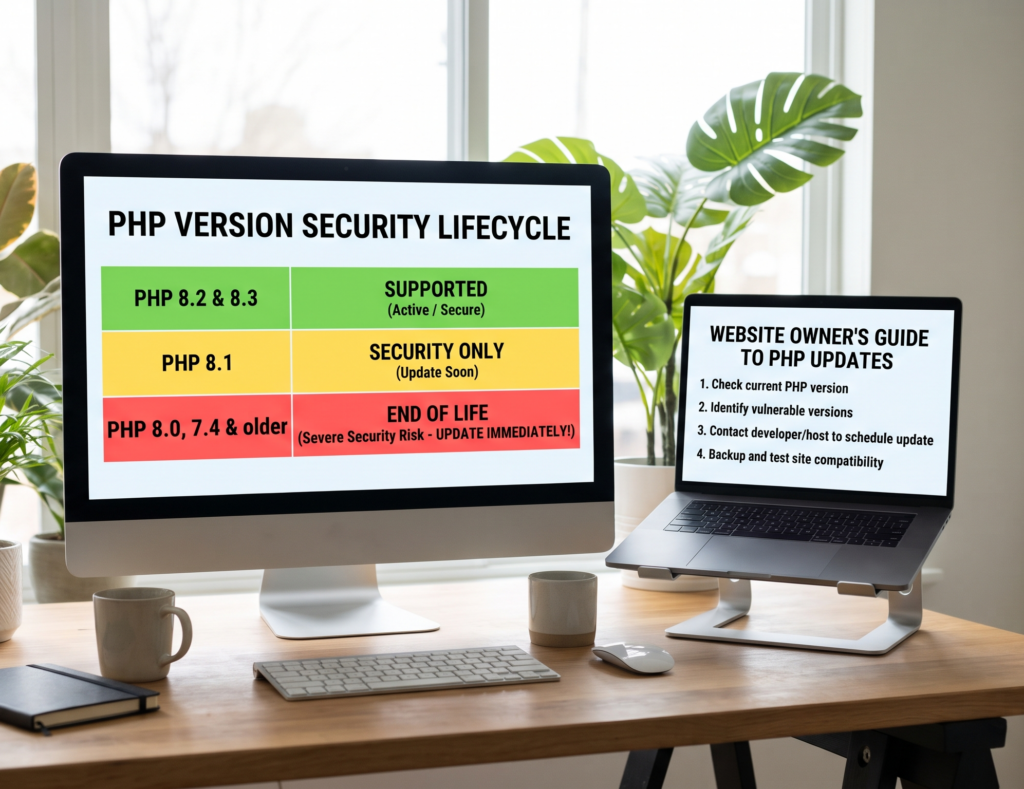
Which PHP Versions Need Security Updates? A Website Owner’s Guide
The PHP versions that need security updates depend on the vulnerabilities affecting your server, the PHP branch you use and whether your hosting provider has applied the required fixes. For the PHP2Shell vulnerabilities disclosed in October 2026, the fixed releases are PHP 8.5.12, 8.4.27, 8.3.36 and 8.2.35. Website owners should check their active PHP runtime, confirm the patch status and review whether their version still receives security support.
Which PHP Versions Are Affected by PHP2Shell?
PHP2Shell refers to two critical vulnerabilities, CVE-2026-109618 and CVE-2026-109619. These vulnerabilities can allow unauthenticated attackers to execute code remotely on affected PHP installations.
The PHP project released security fixes on 21 October 2026. The following table shows the fixed releases for these two vulnerabilities.
| PHP branch | Fixed release for PHP2Shell |
| PHP 8.5 | 8.5.12 |
| PHP 8.4 | 8.4.27 |
| PHP 8.3 | 8.3.36 |
| PHP 8.2 | 8.2.35 |
If your website runs an earlier release in one of these branches, contact your hosting provider or server administrator to confirm whether the required security fix has been applied.
These versions address the two PHP2Shell vulnerabilities, not every possible PHP security issue. You should also check the official PHP security advisories for other vulnerabilities and subsequent updates.
Are Older PHP Versions Still Supported?
PHP versions have a defined support lifecycle. A branch generally receives active support first, followed by a period of security-only support. Once that period ends, the main PHP project no longer provides security updates for the branch.
As of October 2026, the PHP project’s published support schedule is:
| PHP branch | Security support ends | Status in October 2026 |
| PHP 8.5 | 31 December 2029 | Active support |
| PHP 8.4 | 31 December 2028 | Active support |
| PHP 8.3 | 31 December 2027 | Security fixes only |
| PHP 8.2 | 31 December 2026 | Security fixes only |
| PHP 8.1 and older | Support has ended | Unsupported by the main PHP project |
Support dates may change, so check the official PHP supported versions before planning an upgrade.
An unsupported PHP branch can leave your website exposed to vulnerabilities for which the main PHP project no longer releases fixes. Some hosting providers and operating system vendors maintain their own packages and may backport security patches to older versions.
That means an older displayed version does not always prove that a particular vulnerability remains unpatched. Ask your provider to confirm the actual security status of your installation.
How Can You Check Which PHP Version Your Website Uses?
You do not always need technical server access to identify your PHP version. The method depends on your hosting setup.
1. Check PHP in WordPress
If you use WordPress, sign in to the dashboard and open Tools → Site Health → Info → Server.
This section may display the PHP version used by your website. Record the version and compare it with the relevant PHP security advisory.
Remember that the displayed version alone may not reveal vendor-specific security fixes.
2. Check Your Hosting Control Panel
Log in to your hosting account and look for a PHP configuration section. Depending on your provider, it may be called PHP Selector, MultiPHP Manager or PHP Configuration.
Confirm which PHP version is assigned to the domain you want to check. If your account contains multiple websites, repeat the process for each relevant domain.
3. Ask Your Hosting Provider
If you cannot find the version or establish whether it is patched, contact your provider and ask:
- Which PHP version serves my website?
- Does the active runtime contain the fixes for CVE-2026-109618 and CVE-2026-109619?
- Is my PHP branch still supported?
- Are vendor-specific security patches or backported fixes being used?
- Do any other PHP installations or application environments need updating?
This is particularly important on shared hosting, where the provider normally manages the server-side PHP installation.
Is the Latest PHP Version Always the Safest Choice?
Not necessarily. The newest PHP branch is not automatically the best choice for every live website.
A PHP upgrade must account for compatibility with your website’s framework, plugins, themes, extensions and custom code. An application built for an older PHP version may produce errors or stop working if you upgrade without testing.
However, compatibility concerns should not be used to ignore a critical security vulnerability.
A practical approach is to:
- Identify the PHP version currently serving your website.
- Confirm which security fixes are required.
- Check the compatibility requirements of your website and its components.
- Back up your website and database.
- Test the planned upgrade in a staging environment when possible.
- Apply the update and verify that the intended PHP runtime is active.
- Test important website features after the change.
For a critical vulnerability, work with your hosting provider or developer to prioritise remediation while managing compatibility risks.
What If Your Website Uses PHP 8.1 or an Older Version?
If your website runs PHP 8.1 or an older branch, investigate its support and patch status promptly.
These branches no longer receive regular security updates from the main PHP project. Depending on your operating system and hosting provider, a vendor may supply backported fixes, but you should obtain confirmation rather than assume they are present.
Your options may include:
- Moving to a supported PHP branch.
- Applying a verified vendor security update if one is available.
- Testing your application for compatibility before upgrading.
- Asking your hosting provider to help plan the migration.
- Restricting exposure if a critical vulnerability cannot be patched immediately.
For PHP2Shell, the US Cybersecurity and Infrastructure Security Agency recommended urgent patching and advised organisations unable to update affected systems, including those using unsupported PHP versions, to take PHP-based systems offline until they could be patched or updated.
For a public-facing business website, discuss the safest practical response with your hosting provider rather than making untested server changes.
Does Updating PHP Fix Every Security Problem?
No. A PHP security update addresses the vulnerabilities included in that update. It does not automatically fix unrelated problems in WordPress, plugins, themes, server configuration or application code.
For example, PHP2Shell and CVE-2026-115560 are separate security issues. Applying the PHP2Shell fixed releases does not, by itself, establish that every other PHP vulnerability has been addressed.
Website owners should review current advisories, maintain the website’s software and check whether other PHP environments require updates.
There is also an important distinction between patching a vulnerable server and investigating a possible compromise. If your website was exposed before the fix was applied, investigate suspicious files, administrator accounts, server processes and relevant logs when appropriate.
An update can close a vulnerability without removing malicious changes that may already exist.
When Should You Get Professional Help?
Consider professional assistance if you cannot confirm your PHP patch status, your hosting provider cannot explain the server configuration, or your website relies on an older PHP branch with compatibility problems.
Professional support may help with:
- Identifying the active PHP version and applicable security updates.
- Reviewing hosting configuration and separate PHP installations.
- Planning a compatible PHP upgrade.
- Applying and verifying security fixes.
- Testing website functionality after remediation.
- Investigating suspicious activity if a compromise is suspected.
Confirm the scope of the work before engaging a provider. Applying a security patch and investigating an already compromised server are different tasks.
For businesses that need help with PHP security remediation, Alohomora Solution’s PHP vulnerability fixing service is an option to review. Confirm that the service covers your hosting environment and specific requirements before proceeding.
Final Thoughts
Knowing which PHP versions need security updates helps you make better decisions about website maintenance. However, the displayed version number is only part of the picture. You also need to know whether the relevant security fixes are installed and whether your PHP branch still receives support.
Start by checking the active PHP runtime, confirming the applicable patches and reviewing the official support schedule. If you use an unsupported version, plan a suitable upgrade or obtain confirmation of vendor-provided security fixes.
Keeping PHP maintained alongside WordPress, plugins and themes helps reduce avoidable security risks and supports more reliable website operation.
Frequently Asked Questions
1. Which PHP versions are affected by PHP2Shell?
The PHP2Shell vulnerabilities affect PHP versions before the fixed releases in the affected branches: PHP 8.5.12, 8.4.27, 8.3.36 and 8.2.35. Ask your provider to confirm vendor-specific patches where applicable.
2. Is PHP 8.2 still supported?
As of October 2026, PHP 8.2 is in its security-only support period, scheduled to end on 31 December 2026. Check the official PHP support schedule for current information.
3. Are PHP 8.1 and older versions safe to use?
They are no longer supported by the main PHP project. Some vendors may supply backported security fixes, so confirm your installation’s patch status and plan an upgrade where appropriate.
4. How do I check my website’s PHP version?
In WordPress, open Tools → Site Health → Info → Server. You can also check your hosting control panel or ask your hosting provider to confirm the version serving your domain.
5. Should I upgrade PHP if my website is working properly?
Yes, you should keep PHP within a supported and appropriately patched version. Before upgrading, check application compatibility and test the change where possible. A website working normally does not prove that its PHP runtime is secure.